AI agent monitor for macOS · free, no account
See Claude Code and Codex working, waiting, and done. Jump back to the exact session, review Claude permissions, and keep long runs awake behind a private nap screen.
TWO SHORT DEMOS
Watch NapCat work.
Both demos show features in the Mac app you can download today.
MAC APP · AVAILABLE NOW
Meet the notch that does more.
See media, focus, screen naps, shortcuts, live AI work, and permission decisions in 15 seconds.
Read the film transcript
NapCat puts music, focus, screen naps, shortcuts, and active AI sessions in one MacBook notch. See Claude Code, Codex, and other sessions, return to the exact task, and review file changes before allowing them.
agent watch · local first
Active work comes to you.
See what is working, what needs you, and what finished. Claude Code gets rich local context, permission previews, and input forms. Codex CLI and Desktop threads keep stable identities. Click a row to return to the exact session.
Know the depth of every connection.
NapCat no longer hides every provider behind one vague green dot. Settings shows what is live, what local data is readable, and which capabilities each adapter can honestly provide.
Rich context for Claude Code and Codex · process status for other recognized CLIs
island + nap screen
Make it fit your Mac.
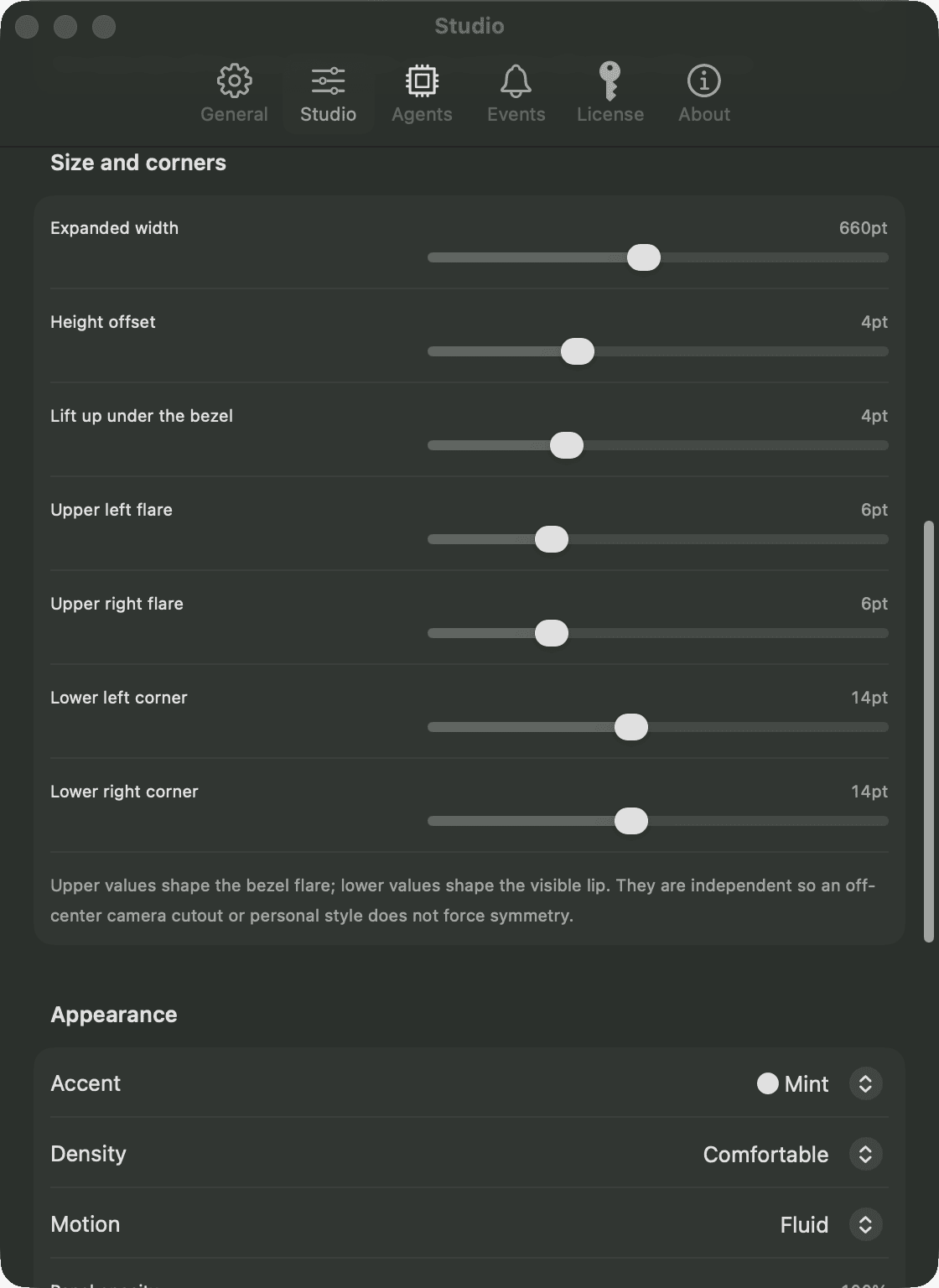
Tune the island shape, choose click or hover, and keep only the modules you use. The nap screen has its own clock, colour, ambience, and background, including a picture you choose.
no asterisks
The whole truth, in one table.
pricing
There’s nothing to buy.
NapCat is a side project, so it has nothing to sell you. Every feature is in the download, with no Pro version waiting behind it. The license check wasn’t switched off. It was deleted.
no account · no license key · no trial clock · 40 releases since July
questions
Before you ask.
Does the work really keep running while it looks asleep?
Yes. The nap is a screen over your displays, not a sleep. Builds, agents and downloads all keep going, and keep-awake holds off display sleep, system sleep and the lock timer.
Is my code or terminal being read by a server?
No. Mac monitoring and Activity stay local. The optional Claude usage meter talks directly to Anthropic using Claude Code's existing login. Optional product analytics is off by default and never contains prompts, responses, project names or paths.
Which AI coding agents does NapCat support?
Claude Code and Codex have the richest session context. NapCat also recognizes popular local agent CLIs at the process level. See the current provider-by-provider details on the agents page.
Does NapCat track Codex Desktop as well as Codex CLI?
Yes. NapCat reads local Codex thread activity from the Desktop app and follows Codex CLI processes. Clicking a Desktop session opens that exact Codex thread.
Can NapCat answer Claude Code questions from the notch?
It can answer permission prompts and structured MCP input forms exposed through Claude Code's Elicitation hook. Simple choices stay in the notch; typed or secret fields open a native form after you click. For terminal-only questions, NapCat marks the exact session Needs you and jumps back to it.
Can my own scripts or unsupported agents appear in the notch?
Yes. NapCat includes a local-only Live Activity CLI. A script can publish Working, Needs you or Done cards, attach project context, and remove them when finished.
Does NapCat include a focus timer?
Yes. Start a 25- or 50-minute focus session from the island or menu bar. The timer survives an app relaunch, and the island also shows battery and power-source status.
Does NapCat track my AI coding activity?
Yes. The Activity view stores a private 53-week contribution map on your Mac, with daily agent time, session, prompt and finished-work totals. Keep up to two years of history or clear it whenever you want.
Does NapCat work without a MacBook notch?
Yes. On a Mac without a physical notch, you can enable a small floating black island and tune its width, thickness and corner radius.
Can I customize what appears in the island?
Yes. Island Studio controls all four corners, width, lift, density, accent, opacity and motion. You can open it by click, hover or both, hide or reorder modules, change roster details, pin or hide sessions and export the island setup.
Can I stop old or closed sessions from staying in the notch?
Yes. Done and idle rows expire on a timer you choose, while working and Needs you rows stay visible. You can also hide one session, a whole project or a provider, and restore hidden items later.
Can NapCat stay quiet overnight?
Yes. Quiet hours work across midnight and silence sounds and macOS notifications while the island continues updating. Each Needs you, Done and focus alert can also be enabled separately.
Why is NapCat free?
It's a side project, so there's nothing to sell. Every feature is in the download, and nothing in the app pays for itself with your work: agent monitoring stays on your Mac, and product analytics stays off unless you turn it on.
Will it stay free?
Yes. The license check wasn't switched off in the app, it was deleted, and there's no Pro version to upgrade to. Updates keep arriving the way they always have, through Sparkle.
Do I need an account or a license key?
No. Download it, open it, and it works. There's nothing to sign in to, activate or renew.
Is NapCat related to NapCatQQ?
No. NapCat for Mac (napcat.app) is a free macOS menu-bar app for monitoring coding agents. It has nothing to do with NapCatQQ, the unrelated QQ bot framework of a similar name.
go dark
Put your Mac's work where the notch is.
See the agents. Return to the right session. Keep the long run awake. If it earns a spot in your menu bar, tell someone who runs agents too.
Download NapCat